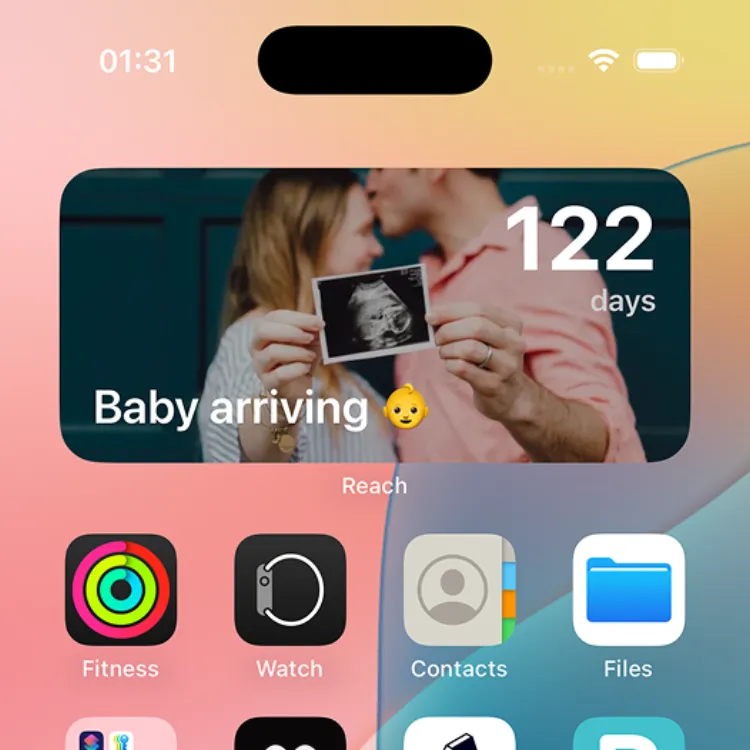
วิดเจ็ตนับถอยหลังสู่กำหนดคลอดบนหน้าจอหลัก
ทำไมคุณพ่อคุณแม่ที่กำลังรอคอยทุกคนต้องมีวิดเจ็ตนับถอยหลังกำหนดคลอด
การตั้งครรภ์เป็นหนึ่งในการนับถอยหลังที่น่าตื่นเต้นที่สุดในชีวิต ตั้งแต่วินาทีที่รู้ คุณเริ่มนับ: สัปดาห์ วัน บางครั้งนับเป็นชั่วโมง แต่การเปิดแอปหรือเช็คปฏิทินตลอดเวลาก็น่าเบื่อ
วิดเจ็ตนับถอยหลังกำหนดคลอดแสดงตัวเลขนั้นบนหน้าจอหลักของคุณ ทุกครั้งที่หยิบโทรศัพท์ คุณจะเห็นว่าเหลืออีกกี่วันจะได้พบลูกน้อย ไม่ต้องแตะ ไม่ต้องค้นหา แค่ตัวเตือนที่สวยงามว่าลูกน้อยกำลังจะมาถึง
วิธีตั้งค่าวิดเจ็ตนับถอยหลังคลอดบน iPhone
การตั้งค่าวิดเจ็ตนับถอยหลังการตั้งครรภ์ใช้เวลาไม่ถึงสองนาทีด้วย Reach แอปนับถอยหลังฟรีที่มีวิดเจ็ตสวยงามทั้งหน้าจอหลักและหน้าจอล็อก (ดูวิธี)
ขั้นตอนที่ 1: สร้างการนับถอยหลังกำหนดคลอด
- ดาวน์โหลด Reach ฟรีจาก App Store หรือ Google Play
- แตะปุ่ม + เพื่อสร้างกิจกรรมใหม่
- ตั้งชื่อเช่น "ลูกน้อยกำลังมา" หรือ "กำหนดคลอด"
- ตั้งวันที่เป็นวันกำหนดคลอดโดยประมาณ
- เลือกรูปภาพพื้นหลัง อาจเป็นรูปอัลตราซาวด์ครั้งแรกหรือสีพาสเทลอ่อนๆ
- แตะ สร้าง
ขั้นตอนที่ 2: เพิ่มวิดเจ็ตบนหน้าจอหลัก
- กดค้างบนหน้าจอหลักจนกว่าไอคอนจะสั่น
- แตะปุ่ม แก้ไข ที่มุมบนซ้าย
- ค้นหา Reach
- เลือกขนาดวิดเจ็ต (ขนาดกลางเป็นที่นิยมที่สุดสำหรับกำหนดคลอด)
- แตะ เพิ่มวิดเจ็ต แล้ววางในตำแหน่งที่ต้องการ
เท่านั้นเอง การนับถอยหลังคลอดของคุณจะมองเห็นได้ตลอดเวลา แสดงวัน ชั่วโมง และนาทีจนถึงวันกำหนดคลอด


ขั้นตอนที่ 3: เพิ่มบนหน้าจอล็อกด้วย
- กดค้างหน้าจอล็อกของคุณ
- แตะ ปรับแต่ง → หน้าจอล็อก
- แตะบริเวณวิดเจ็ตใต้นาฬิกา
- ค้นหา Reach แล้วเพิ่ม
ตอนนี้คุณจะเห็นการนับถอยหลังคลอดทุกครั้งที่มองโทรศัพท์ แม้ไม่ต้องปลดล็อก
แชร์การนับถอยหลังกับคู่ครอง
หนึ่งในส่วนที่ดีที่สุดของการใช้ Reach สำหรับนับถอยหลังคลอดคือคุณสามารถแชร์กับคู่ครอง ทั้งคู่จะเห็นการนับถอยหลังเดียวกันบนโทรศัพท์ของตัวเอง
วิธีทำ:
- เปิดการนับถอยหลังกำหนดคลอดใน Reach
- แตะปุ่ม แชร์
- ส่งลิงก์ให้คู่ครอง
- พวกเขาเข้าร่วมการนับถอยหลังและเพิ่มวิดเจ็ตบนหน้าจอหลักของตัวเองได้
คู่สามีภรรยาหลายคู่ยังแชร์การนับถอยหลังกับปู่ย่าตายาย พี่น้อง และเพื่อนสนิทด้วย ทุกคนได้นับถอยหลังไปด้วยกัน
วิธีสร้างสรรค์ในการใช้การนับถอยหลังคลอด
- เหตุการณ์สำคัญการตั้งครรภ์รายสัปดาห์ สร้างการนับถอยหลังเพิ่มเติมสำหรับแต่ละไตรมาสหรือนัดอัลตราซาวด์ครั้งถัดไป
- นับถอยหลังงานเลี้ยงรับขวัญ ติดตามว่าเมื่อไหร่จะถึงงานเฉลิมฉลอง
- เดดไลน์ห้องเด็ก ตั้งการนับถอยหลังสำหรับวันที่ต้องการให้ห้องเด็กพร้อม
- ลาคลอด นับถอยหลังถึงวันทำงานวันสุดท้ายก่อนลูกน้อยมาถึง
- ปาร์ตี้เปิดเผยเพศ ถ้าคุณวางแผนจัดงาน ให้มันมีการนับถอยหลังของตัวเอง
ทำไม Reach เป็นแอปที่ดีที่สุดสำหรับนับถอยหลังกำหนดคลอด
| คุณสมบัติ | Reach | แอปอื่น |
|---|---|---|
| วิดเจ็ตหน้าจอหลัก | ฟรี | เสียเงิน |
| วิดเจ็ตหน้าจอล็อก | ฟรี | หายาก |
| นับถอยหลังแบบสด | Premium | Premium |
| แชร์กับคู่ครอง | ใช่ | ไม่ |
| พื้นหลังที่กำหนดเอง | ฟรีสูงสุด 4 การนับถอยหลัง | Premium |
| โฆษณา | ไม่มี | มี |
| iPhone & Android | ใช่ | หายาก |
คำถามที่พบบ่อย
วิดเจ็ตนับถอยหลังคลอดฟรีจริงไหม?
วิดเจ็ตหน้าจอหลักและหน้าจอล็อกฟรีทั้งหมด ส่วนการนับถอยหลังแบบสด (ที่แสดงชั่วโมง นาที และวินาทีแบบเรียลไทม์) ต้องซื้อ Premium แบบครั้งเดียว เช่นเดียวกับภาพพื้นหลังที่กำหนดเองสำหรับการนับถอยหลังมากกว่า 4 รายการ
กำหนดคลอดเปลี่ยน แก้ไขการนับถอยหลังได้ไหม?
เปิดการนับถอยหลังใน Reach แตะแก้ไข แล้วอัปเดตวันที่ วิดเจ็ตจะอัปเดตอัตโนมัติ
วิดเจ็ตจะทำให้แบตหมดไหม?
ไม่ วิดเจ็ต Reach ออกแบบมาให้เบา iOS และ Android จัดการอัตราการรีเฟรชวิดเจ็ตอย่างมีประสิทธิภาพ ผลกระทบต่อแบตเตอรี่น้อยมาก
ติดตามการนับถอยหลังการตั้งครรภ์หลายรายการได้ไหม?
ได้ คุณสามารถสร้างการนับถอยหลังได้มากเท่าที่ต้องการ (กำหนดคลอด งานเลี้ยงรับขวัญ เดดไลน์ห้องเด็ก นัดหมายครั้งถัดไป) และเพิ่มวิดเจ็ตแยกสำหรับแต่ละรายการ
เกิดอะไรขึ้นหลังลูกเกิด?
เมื่อผ่านวันกำหนดคลอดแล้ว การนับถอยหลังจะเปลี่ยนเป็นการนับขึ้น แสดงว่าลูกน้อยอายุกี่วันแล้ว คุณพ่อคุณแม่หลายคนชอบเก็บไว้เป็นตัวเตือนประจำวันของอายุลูกน้อย