Together Since Counter: Count the Days of Your Love Story
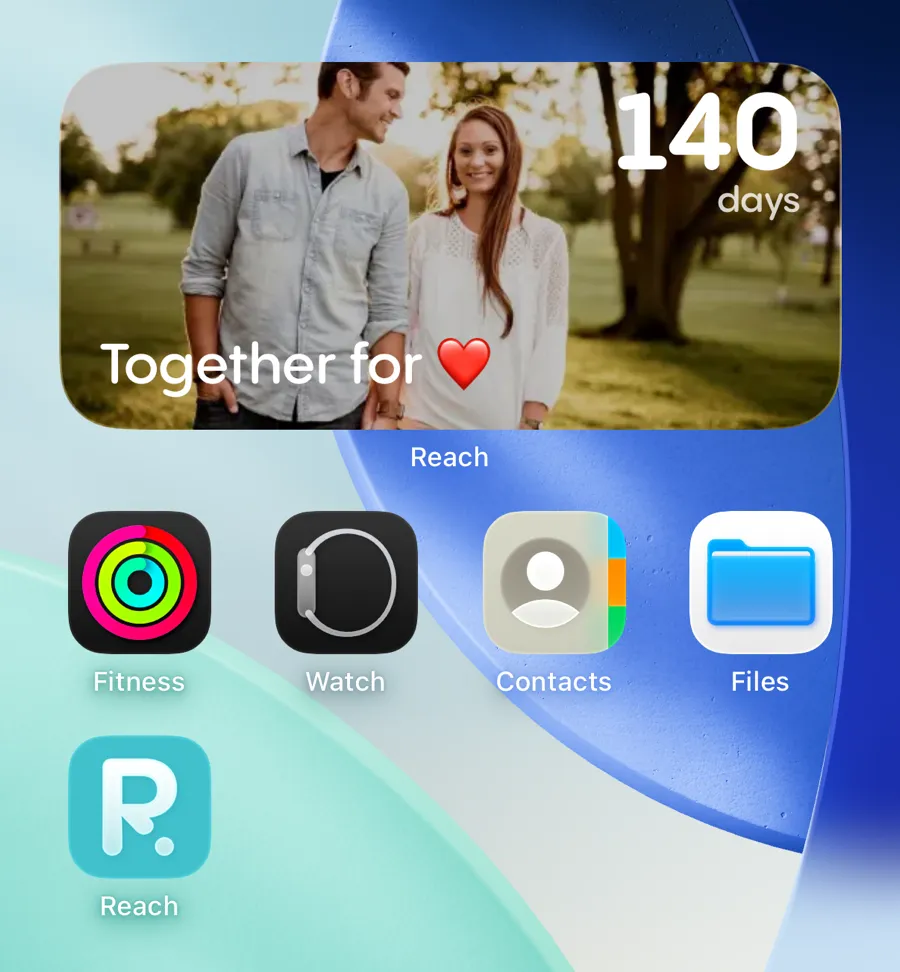
To count down to your anniversary, create a countdown for the date you celebrate, add it as a widget to your Home Screen or Lock Screen, and share it with your partner. Then create a second one for the day you got together. Since that date is in the past, Reach counts up instead, turning it into a "together since" calculator, with the widget reading "Together for 1,284 days." Both take about a minute to set up, and both are free.
What you need
- An iPhone or an Android phone
- The Reach app, free on the App Store and on Google Play
- One date: the day you got together, the date of your next anniversary, or both
That is the whole list. No account is needed to create your first countdown.
Couples want two numbers, not one
Every other countdown has a single job: shrink a number to zero. An anniversary is the one date where the number running the other way matters just as much.
- Days until is the planning number. It tells you when to book the table, order the gift and put the day off work in.
- Days together is the accumulation number. It plans nothing. It shows what you have already built, and it grows every morning.
Couples work this out on their own. Roughly one countdown in seven created in Reach points at a date that has already happened, and the most frequent names among them are exactly what you would guess: "Us," "You and me," "Together for," "juntos por." Those are not mistakes. They are people using a countdown as a counter.
This guide sets up both, starting with the date itself.
Which date is your anniversary?
Every couple has this argument once. A widget settles it for good, because the date ends up written somewhere you both look at every day.
- The first date. Easy to place on a calendar, and the version most couples default to.
- The day you made it official. The conversation, the message, the "so, are we together?" Harder to date precisely, more meaningful to some.
- The first kiss. Popular when the first date and the official date are weeks apart.
- The wedding day. Once you are married most couples keep two: the wedding anniversary, and the day they met.
- The day the distance ended. For couples who spent a year or two apart, the day one of them landed for good outranks the first date. Our guide to long-distance relationships goes into that wait in detail.
There is no correct answer, only a shared one. Pick the date, create the countdown, share it, and neither of you ever has to remember it again.
How to add an anniversary countdown widget to your phone
Here is how to create an anniversary countdown widget step by step with Reach.
Step 1: Create the countdown
- Download Reach for free from the App Store or Google Play
- Tap the + button to create a new event
- Name it for the occasion: "Our anniversary," "5 years," "Us"
- Set the date, and the time if the day has a fixed moment: the restaurant booking, the ceremony hour, the train
- Set the recurrence to Yearly so it rolls over to 2027 on its own
- Choose a background photo, ideally one from the day itself
- Tap Create
The yearly recurrence is the step people skip and regret. Without it the countdown reaches zero, flips into a count-up and quietly stops being useful. With it, the morning after your anniversary the widget already reads 364 days.
Step 2: Add the widget to your home screen
- Long-press your home screen until the apps jiggle
- Tap Edit in the top-left corner
- Search for Reach
- Choose a widget size (the medium size shows your photo and the number together)
- Tap Add Widget
For a full walkthrough with screenshots, see our illustrated iPhone widget guide.
Step 3: Put it on the lock screen
An anniversary is not a deadline you need reminding of hourly, which is exactly why the lock screen suits it. You see the number in passing, dozens of times a day, without ever opening an app.
The live countdown widget on the iPhone lock screen updates in real time down to the second, which is worth turning on for the last day. If you wear an Apple Watch, the countdown complication on your watch face puts the same number on your wrist.
How to count the days you have been together
Same app, one difference: the date goes in the past.
- Create a second countdown with the + button
- Name it "Together since," "You and me," or just the two of you
- Set the date to the day you got together, however far back that is
- Leave the recurrence on None: this one is not an event, it is a running total
- Tap Create
Because the date has already passed, the number counts up instead of down: 1 day, then 100, then 1,000. Put that widget next to the anniversary one and your home screen carries the whole story at a glance: how far you have come on one side, how long until the next celebration on the other.

Milestones worth their own countdown
Once the counter is running, the round numbers start to matter. These are the ones couples actually celebrate, and each deserves its own anniversary countdown so it does not arrive unnoticed.
| Milestone | How long that is | Why couples mark it |
|---|---|---|
| 100 days | 3 months and 9 days | A proper celebration in Korea, where the 100th day is marked with gifts and a photo. Spreading fast everywhere else |
| 6 months | 182 days | The first milestone that feels earned rather than automatic |
| 1 year | 365 days | The one everyone remembers, and the one most often booked in advance |
| 500 days | 1 year and 4 months | An excuse for a weekend away in the dead months between anniversaries |
| 1,000 days | 2 years and 9 months | The favourite of couples who keep a counter. It lands on a random Tuesday, which is half the charm |
| 5 years | 1,826 days | The first anniversary that people throw a party for |
| 10 years | 3,652 days | Usually the point where couples start counting in years and stop counting in days |
| 10,000 days | 27 years and 4 months | Rare, precise and unforgettable. Nobody else will have thought of it |
Want the exact date one of these lands on? Our countdown calculator gives you the day that falls any number of days from a date, and the number of days between two dates.
Wedding anniversaries and what each year is called
If the date you count to is a wedding day, each year comes with a traditional material behind it, which solves the gift question before it is asked.
| Year | Traditional name |
|---|---|
| 1 | Paper |
| 2 | Cotton |
| 3 | Leather |
| 5 | Wood |
| 10 | Tin |
| 15 | Crystal |
| 20 | China |
| 25 | Silver |
| 40 | Ruby |
| 50 | Gold |
| 60 | Diamond |
The lists differ from country to country, so treat this as the common version rather than the rule. Still planning the wedding itself? See our wedding countdown widget guide.
Share it with your partner
- Open the countdown you created
- Tap the Share button
- Send the link to your partner
- They tap it and join the same countdown, on their own phone, with their own widget
Sharing changes what the countdown is for. On your own it is a reminder. Shared, it is the same number on two screens, which is the entire point of a shared countdown. It also removes the oldest anniversary failure mode: one of you remembering and the other not.
For couples who are apart, the same mechanism carries the other big date. Our guide to the couple reunion countdown covers counting down to seeing each other again.
Anniversary countdown widget vs. a calendar reminder
Your anniversary is probably already in your calendar. Here is what a dedicated anniversary countdown widget does that a calendar entry cannot:
| Feature | Calendar reminder | Reach |
|---|---|---|
| Shows the days left, at a glance | You have to count | Updated automatically |
| Visible without unlocking your phone | Buried in the calendar app | Home and lock screen widget |
| Counts the days you have been together | Not a thing a calendar does | Set a past date and it counts up |
| Shared with your partner | Two separate reminders | One countdown, both phones |
| Carries the photo from that day | A line of text | Your own photo as the background |
| Warns you early enough to book something | Alerts you on the day | Visible for weeks beforehand |
When the number reaches zero
The widget gets you to the day. What you do with it is the easy part, and it does not have to be expensive:
- Go back to where it started. The restaurant, the bar, the bench. Same place, several years of difference.
- Make the photo the gift. The background you picked when you created the countdown, printed.
- Start the next countdown together. The trip, the move, the wedding. The evening ends with a new number on both phones.
Our list of 25 countdown ideas for couples has the rest, and if the next date on the horizon is a birthday, the birthday countdown widget works the same way.
Frequently asked questions
How do I add an anniversary countdown widget to my phone?
Create the countdown in Reach with your anniversary date, set the recurrence to yearly, then long-press your home screen, tap Edit, search for Reach and pick a widget size. Add the same countdown to your lock screen, which is the screen you actually look at. It takes about a minute, it works on iPhone and Android, and it is free.
How do I count how many days we have been together?
Create a countdown and set the date to the day you got together. Because that date is in the past, the number counts up rather than down, so the widget shows the total number of days you have been together and adds one every morning. Leave the recurrence off so it keeps accumulating.
What date should we use as our anniversary?
Whichever one you both agree on: the first date, the day you made it official, the first kiss or the wedding day. The practical answer is to pick one, put it in a shared countdown, and stop relitigating it. Plenty of couples keep two countdowns, one for the day they met and one for the wedding.
Does the countdown restart automatically every year?
Yes, if you set the recurrence to yearly when you create it. The day after your anniversary the widget shows 364 days and counts down to next year on its own. There is also a monthly recurrence, which is what couples use for monthiversaries.
Is Reach free for anniversary countdowns?
Yes. Creating and sharing anniversary countdowns is completely free, and so are the home screen and lock screen widgets. Premium is optional: it unlocks all widget types (including the live countdown and the list countdown), your own photos as backgrounds beyond the first 4 countdowns, and unlimited countdowns. The free version holds up to 10.
Can I create an anniversary countdown widget on Android?
Yes. Reach is on both the App Store and Google Play, and the widgets work on both.
Can my partner see the same countdown?
Yes. Tap Share and send them the link. Whoever opens it joins the same countdown and can add the widget to their own phone, so you are both looking at the same number. If you change the date or the photo, they see the change immediately.
Can I count down to a monthly anniversary?
Yes. Set the recurrence to monthly and the countdown resets on the same day of every month. It is the simplest way to keep a monthiversary without doing the arithmetic each time, and it pairs well with a days-together counter running alongside it.