iPhone Duo Countdown App: Reach on Apple's First Foldable
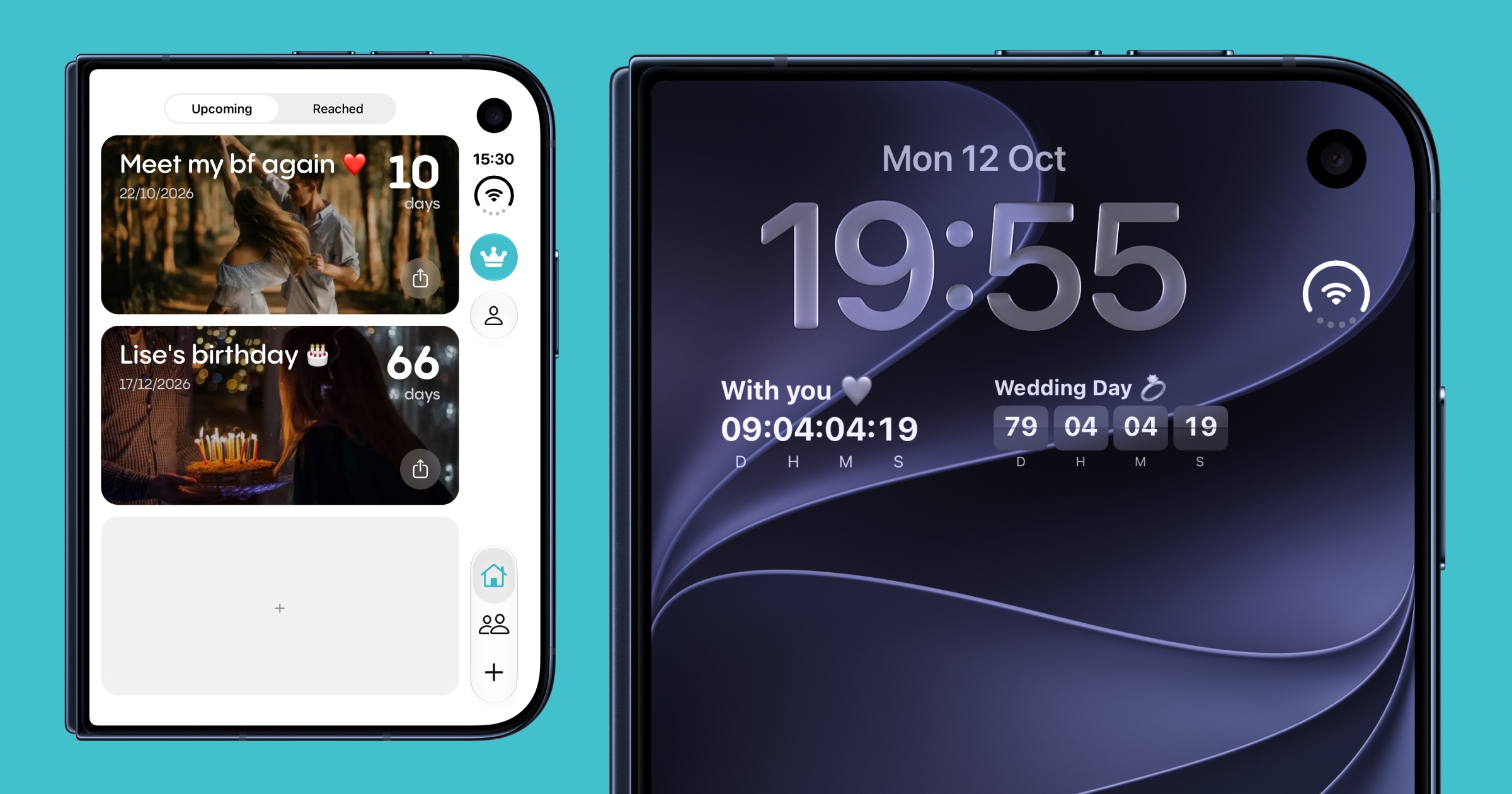
Yes, Reach works on iPhone Duo, and it was adapted for it from day one. On the 5.4-inch outer display, Reach moves its tabs and buttons to the side strip like the system apps do. Unfold to the 7.6-inch inner display and your countdowns spread into two columns. Reach also turns sideways, runs in Split View next to another app, and its countdown widgets work on the Home Screen, the Lock Screen and the new Today View.
This guide covers everything that changes when you open Reach on Apple's first foldable iPhone: the outer display, the unfolded layout, multitasking, widgets, and what to set up first.
Is Reach compatible with iPhone Duo?
Yes. iPhone Duo ships with iOS 27.1, and Reach recognises the device and adapts its whole interface to it. There is no separate app to download and no setting to turn on: install Reach from the App Store, sign in, and every countdown you already have is there, on both displays.
What "compatible" means in practice:
- Native navigation on the outer display. Tabs, close and save buttons sit in the system's side strip, not in a bar drawn at the bottom.
- A layout for the big screen. Unfolded, countdown cards sit two by two at their phone size instead of being stretched across 7.6 inches.
- Rotation. Reach stays upright on other iPhones, but on iPhone Duo it follows the device when you turn it on its side.
- Split View. Reach runs in either half of the inner display, next to Calendar, Messages, or any other app.
- Every widget. Home Screen, Lock Screen, Today View and the new Extra Large Portrait size on iOS 27.
Folded: Reach on the iPhone Duo outer display
Closed, iPhone Duo is about the size of a passport. Its outer display gives you 90% of the screen area of an iPhone 18 Pro, but Apple moved the controls: the Dock, app navigation and the Dynamic Island run down the side of the screen instead of along the top and bottom.
An app that keeps its own bottom tab bar ends up with controls in two places. Reach does not. On the outer display, Reach hands its navigation to the system:
- The Home, Friends and + tabs move to the side strip, next to the system's own controls.
- Buttons such as close, back and save become the round Liquid Glass buttons iOS draws for its own apps, with SF Symbols icons.
- Your countdown cards keep the full width left beside the strip, and pull to refresh stays centred on them.
The result is that Reach looks and behaves like a system app on the outer display, which matters on a screen you will mostly use one-handed for quick checks.
Unfolded: two columns of countdowns on the inner display
Open iPhone Duo and Reach reflows instantly to the 7.6-inch inner display, the largest screen Apple has ever put on an iPhone. Rather than stretching each countdown card across the whole width, Reach lays them out two by two, each at about the size it has on a regular iPhone. You see twice as many events at a glance, photos keep their proportions, and the days remaining stay just as readable.
The same happens in reverse: close the device mid-scroll and Reach returns to a single column on the outer display, without losing your place. Pinned events stay at the top in both layouts.
Split View: Reach next to your calendar or your messages
iOS 27 brings Split View to iPhone for the first time, on the inner display of iPhone Duo. Reach supports it fully. A few combinations that work well:
- Reach + Calendar: plan a trip on one side while you set up the vacation countdown on the other.
- Reach + Messages: create a countdown to a reunion and share it with a friend in the same view, ideal for shared countdowns with friends.
- Reach + Photos: pick the right background picture for an event while you edit it.
In Split View, Reach detects which half it is in and puts its side bar on the outer edge of its window, so nothing collides with the app next to it. When the device is partly folded and a sheet opens in one half of the screen, Reach keeps that sheet's buttons along its top so they never hang off the edge.
Turning iPhone Duo on its side
On every other iPhone, Reach stays in portrait. iPhone Duo is different: its outer display is meant to be turned sideways too, and an app locked to portrait would be drawn on its side. So on iPhone Duo alone, Reach rotates with the device. The widget setup guides even scale their illustrations down when the screen is short, so the step-by-step instructions still fit above the button when the phone is in landscape.
Countdown widgets on iPhone Duo
Widgets are where a countdown app earns its place, and iPhone Duo gives them more room than any iPhone before it. Every Reach widget is available:
- Live Countdown: a Premium widget with days, hours, minutes and seconds ticking on your Home Screen or Lock Screen (see live countdown widgets on the Lock Screen).
- Flip Countdown: a Premium Lock Screen widget that shows your countdown on flip cards, to the second.
- Simple Countdown: one event, its photo and the days remaining, from small to large.
- Event List: your next events in one widget, with how many days are left for each.
On iOS 27, the Live Countdown, Simple Countdown and Event List widgets also come in the new Extra Large Portrait size, which suits the tall inner display. Unfolded, iPhone Duo shows two Home Screen pages side by side with the Today View on the left: a vertical list of widgets that is a natural home for an Event List widget, so your upcoming dates are the first thing you see when you open the phone.
The setup is the same as on any iPhone, covered step by step in how to add a countdown widget to your iPhone.
Reach on iPhone Duo at a glance
| Feature | Outer display (folded) | Inner display (unfolded) |
|---|---|---|
| Navigation | Tabs and buttons in the side strip | Native system tab bar |
| Countdown layout | One column | Two columns |
| Rotation | Portrait and landscape | Portrait and landscape |
| Split View | Not available on the outer display | Either half of the screen |
| Home Screen widgets | All sizes | All sizes, plus Today View |
| Lock Screen widgets | Live and Flip Countdown | Live and Flip Countdown |
Your countdowns follow you from your old iPhone
Your events are tied to your Reach account, not to the phone. When you move to iPhone Duo, sign in and every countdown, photo, tag and friend comes back as it was. If you also wear an Apple Watch, the Reach Apple Watch app keeps working with your new iPhone, complications included.
Frequently asked questions
Does Reach work on iPhone Duo?
Yes. Reach supports iPhone Duo on both displays, with native navigation on the outer display, a two-column layout on the inner display, Split View, rotation and every countdown widget.
Is there a special version of Reach for iPhone Duo?
No. It is the same app from the App Store. Reach detects iPhone Duo on its own and switches to the layout made for it. Just make sure you are on the latest version.
Do countdown widgets work on the iPhone Duo outer display?
Yes. Home Screen and Lock Screen widgets work on both the outer and inner displays, including Live Countdown and Flip Countdown, which tick down to the second.
Can I use Reach in Split View on iPhone Duo?
Yes. Unfold iPhone Duo and open Reach in either half of the inner display, next to any other app. Reach places its controls on the outer edge of its own window so they never overlap the other app.
Does Reach rotate to landscape on iPhone Duo?
Yes. Reach stays in portrait on other iPhones, but on iPhone Duo it follows the device in every orientation, folded or unfolded.
What happens to my countdowns when I fold or unfold the phone?
Nothing is lost. Reach reflows from one column to two (or back) as soon as the display changes, and keeps your pinned events at the top.
Which widget should I put in the iPhone Duo Today View?
The Event List widget is the best fit: it shows your next events and the days left for each in one block, so the Today View tells you what is coming up as soon as you unfold the phone.
Is Reach free on iPhone Duo?
Yes. Reach is free to download and use on iPhone Duo, with the same free plan as on any iPhone. Some extras, such as the Live Countdown and Flip Countdown widgets, are part of Reach Premium.
Will my existing countdowns transfer to iPhone Duo?
Yes. Countdowns are saved to your Reach account. Sign in on iPhone Duo and they all come back, along with your photos, tags and friends.